Is your phone getting hot on a Sardinian beach? Direct sun, hot sand, video recording, navigation and charging can push a smartphone's temperature up quickly. The best move is to get it out of direct sunlight and let it cool naturally. Do not wrap it in a towel or bury it under a beach towel if that traps heat; use shade with airflow instead.
Quick answer: how to keep your phone cool at the beach
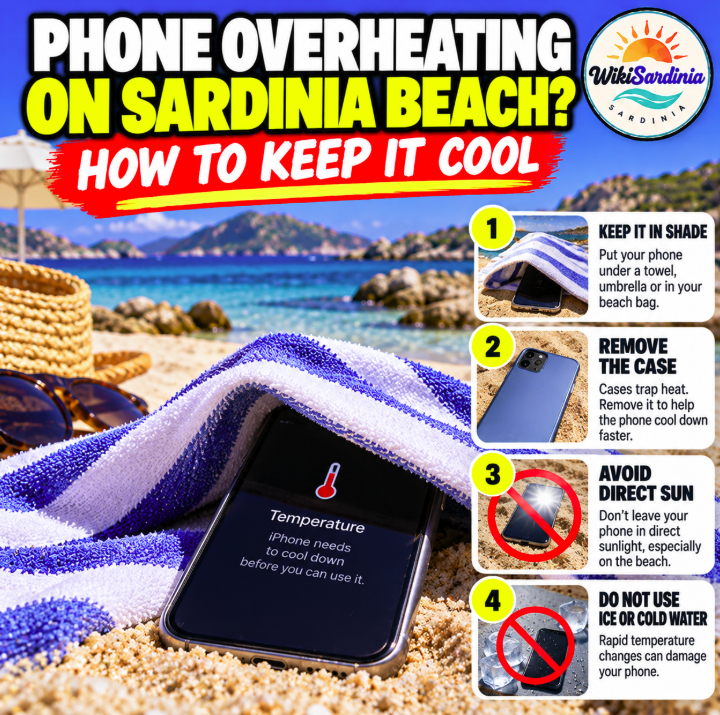
- Move it out of direct sunlight. Keep it in a shaded beach bag or under a proper umbrella, away from hot sand.
- Keep airflow around it. Don't tightly wrap it in a towel or leave it inside a hot, closed bag.
- Stop charging it while it is hot, and disconnect power banks or cables.
- Reduce demanding use. Pause gaming, long video recording, navigation and other intensive apps; lower screen brightness.
- Remove the phone case if it is safe and practical, to help heat escape.
- Let it cool gradually. Do not put it in a fridge, freezer, cooler full of ice or against ice packs.
Should you put your phone under a beach towel?
Not if the towel covers it tightly and traps heat. A towel may shade a phone from the sun, but thick fabric and hot sand can also retain heat. A better option is to place the phone in a shaded, ventilated spot, such as a beach bag kept under an umbrella, without burying it in sand or wrapping it in fabric.
Keep it away from water, sunscreen, wet swimsuits and sand. Shade helps, but it does not make a hot bag or closed car safe for electronics.
Why phones overheat on Sardinian beaches
Summer and early-autumn beach conditions can combine strong sunlight, reflected heat from sand, bright screens and demanding apps. Recording 4K video, using GPS, taking repeated photos or using a hotspot can add to the heat. Charging while the phone is already warm may make the problem worse.
Phones are designed to operate within a specified temperature range. When internal temperatures rise too high, a device may dim the screen, slow down, pause charging, disable the camera flash or display a temperature warning.
What to do if your phone is already too hot
- Stop using it and disconnect the charger.
- Move it to a cool, shaded place with normal airflow.
- Close intensive apps and turn off features you do not need.
- If it displays a temperature warning, follow the on-screen instructions and wait until it returns to a normal temperature.
- If it is extremely hot, swollen, smells unusual or shows signs of battery damage, stop handling or charging it and seek professional assistance.
Don't force the phone to cool quickly. Sudden temperature changes can cause condensation and may damage the device.
Can you put a phone in a fridge or cooler?
No—avoid the fridge, freezer and direct contact with ice. Rapid cooling can cause condensation inside the device, and moisture can damage electronics. A cooler can also be humid, wet or full of melting ice. Use shade and gentle airflow instead.
Should you switch on airplane mode?
Airplane mode can reduce power use if you do not need a mobile connection, especially in areas where the phone struggles to find a signal. You can also switch off hotspot, Bluetooth or GPS when they are not needed. If you need to remain reachable, leave the connection on and focus on shade, lower screen brightness and pausing intensive tasks.
Can you keep using the phone for photos?
Yes, if the device is at a normal temperature. Take shorter photo sessions, avoid leaving the camera recording continuously in direct sun and put the phone back in shade between shots. If the screen dims or a temperature alert appears, stop and let the phone cool.
Where should you store it while swimming?
Keep the phone in a shaded, dry place away from hot sand and direct sun. A bag under an umbrella may help, but don't leave it in a sealed bag that has heated up. If you use a waterproof pouch, remember that it protects against water only when properly rated and sealed; it does not prevent overheating.
Never leave a phone on a dashboard or in a parked car while you swim. Interior temperatures can rise quickly even when the weather feels pleasant.
Does a phone cooling fan help?
External cooling accessories may help in some circumstances, but most beach visitors do not need one. The first steps are to stop charging, reduce demanding use and move the phone out of sunlight. Do not use accessories that introduce water or condensation risk.
Is overheating dangerous for the battery?
Repeated or prolonged exposure to high temperatures can accelerate battery aging. A hot phone may temporarily limit performance or charging to protect itself. If the phone repeatedly overheats in ordinary conditions, or the battery appears swollen or damaged, stop using it and contact the manufacturer or an authorized repair service.
Useful Italian phrases
- Il telefono si sta surriscaldando. — My phone is overheating.
- Posso tenerlo all'ombra? — Can I keep it in the shade?
- Non metterlo sotto il telo. — Don't put it under the towel.
- Devo lasciarlo raffreddare. — I need to let it cool down.
Frequently asked questions
Does putting a phone under a towel keep it cool?
It may shade the phone, but a thick towel can trap heat. Use a shaded, ventilated place instead.
Can I put my phone in the fridge?
No. Rapid cooling and condensation may damage the device.
Should I stop charging my phone if it gets hot?
Yes. Disconnect it and let it cool before charging again.
Does airplane mode cool a phone?
It can reduce power use when connectivity is not needed, but shade and stopping intensive tasks are more important.
Can sand make my phone overheat?
Hot sand can transfer heat to the device. Keep it off the sand and out of direct sun.
Can I leave my phone in the car while I swim?
No. A parked car can become extremely hot. Take it with you or leave it in a secure, shaded place.
The bottom line
To keep your phone cool on a Sardinian beach, keep it shaded and ventilated—not wrapped tightly under a towel. Stop charging if it heats up, reduce demanding use, remove the case if practical and let it cool gradually. Never use a fridge, freezer or ice to cool it quickly.
Official guidance
Check the support page for your phone model: Apple — Keeping iPhone within acceptable operating temperatures; Google Pixel — Keep your phone from getting too warm; Samsung — What to do if your Galaxy device heats up. Follow the manufacturer's guidance for your specific device.