Park on blue lines in Sardinia without using a parking meter? In many participating towns, you can pay for paid street parking through the EasyPark app instead of finding a ticket machine. But blue lines generally indicate paid parking, not free parking. You still need to pay the required fee and follow the local signs, time limits and restrictions.
Important: EasyPark does not work in every parking area. Before leaving your car, check that the exact zone is available in the app and that the local signs allow app payment. If the area is not listed or the app cannot start a session, use the approved payment method shown on the signs.
How to pay for blue-line parking with EasyPark
- Park legally. Check the road signs for paid hours, maximum duration, resident-only restrictions and any permit requirements.
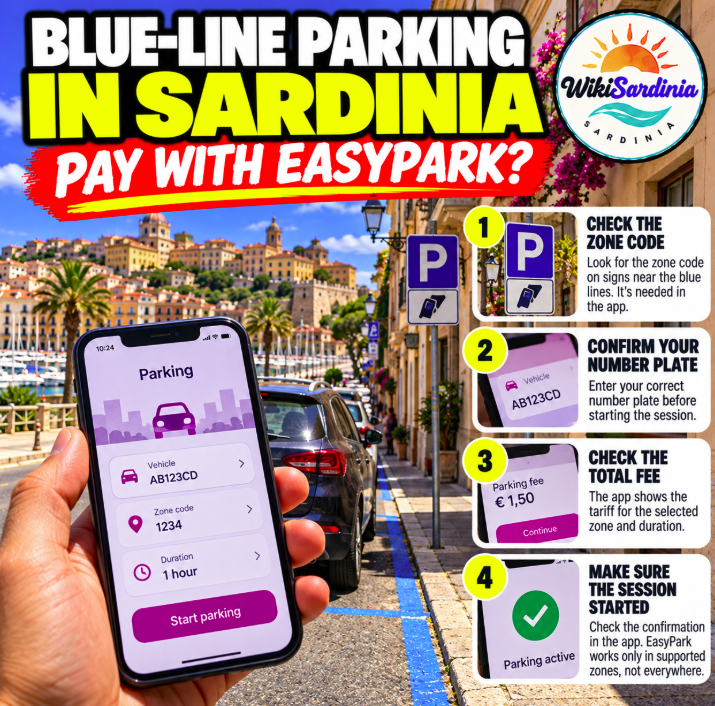
- Open EasyPark. Select the parking area shown on the app map or enter the zone code displayed on the local sign. Make sure it matches the exact street and side of the road.
- Choose the correct vehicle. Check the registration plate carefully, especially if more than one vehicle is saved in your account.
- Set the duration. Enter how long you expect to stay, within the maximum allowed by the municipality.
- Check the price and service fee. EasyPark may add a service fee to the parking charge. The app shows the amount before you confirm.
- Start the session and confirm it is active. Do not assume the payment has started until you see confirmation in the app.
- Extend or stop when appropriate. If the local rules and app allow it, extend your session remotely or stop it early to pay only for the active time.
Does EasyPark let you park for free?
No. EasyPark is a way to pay for an eligible parking space, not a way to avoid the parking charge. The app can help you avoid looking for a meter or returning to the car to extend a session, but you must still pay the local tariff and obey the rules.
How to know if EasyPark works in your Sardinian town
Open the app and check the exact parking area before you leave the car. EasyPark publishes a list of active municipalities and service fees, but coverage can vary by town and by individual parking area. A town being listed does not necessarily mean every blue-line space or car park supports the app.
Use the official EasyPark parking help page and its active cities and service-fee information. If the exact area is unavailable, follow the payment instructions on the street signs.
Watch out for the zone code
One of the most common mistakes is choosing a nearby but incorrect parking zone. Compare the code in the app with the code on the sign or meter. Do not rely on GPS alone, particularly in historic centres where streets and parking sections are close together.
Before confirming, double-check the vehicle registration, zone and duration. Keep the app confirmation or receipt until you have left the parking area.
Do you need to display a paper ticket?
When a parking operator supports EasyPark, payment is normally associated with the vehicle's registration plate through the operator's system, so a paper ticket may not be required. However, follow any instructions posted in the specific area and check the app's guidance. Do not assume a digital session is valid if it failed to start or the zone does not match.
What if the app does not work?
- Check your mobile data connection and payment method.
- Confirm that the zone code is correct and supported.
- Make sure the correct registration plate is selected.
- Look at the local sign for alternative payment methods, such as a parking meter or another authorized app.
- If you cannot start a valid session, pay using the approved alternative rather than leaving the car unpaid.
Can you extend parking from the beach or restaurant?
If the parking zone and local rules support it, EasyPark may let you extend a running session from your phone. Set a reminder and check the maximum permitted stay. An app extension cannot override a time limit, a no-parking restriction or a requirement to move the vehicle after a certain period.
Are there extra EasyPark fees?
EasyPark may charge a service fee in addition to the municipality's parking tariff. The amount depends on the plan and location; check the total shown in the app before starting. The official EasyPark Italy website currently describes its pay-per-use plan as charging a percentage-based service fee with a minimum fee, while subscription options may have different terms. Confirm the current terms in the app because prices and plans can change.
Blue lines, white lines and yellow lines in Italy
- Blue lines: generally paid parking, subject to posted hours and local rules.
- White lines: often free parking, but time limits, permits or other restrictions may apply.
- Yellow lines: usually reserved for specific users or purposes, such as residents, disabled parking permit holders, loading or official services. Read the signs carefully.
Road markings and exceptions are governed by local signs and regulations. Never assume a space is available to you just because it is empty.
Useful Italian phrases
- Posso pagare con EasyPark qui? — Can I pay with EasyPark here?
- Qual è il codice dell'area di sosta? — What is the parking zone code?
- Quali sono gli orari di pagamento? — What are the paid parking hours?
- Quanto costa all'ora? — How much does it cost per hour?
- Il parcheggio è gratuito in questo orario? — Is parking free at this time?
Frequently asked questions
Can I park on blue lines in Sardinia without a ticket?
You may be able to pay digitally through EasyPark in participating areas instead of displaying a paper ticket. Blue-line parking is not automatically free, and the app must confirm a valid session.
Does EasyPark work everywhere in Sardinia?
No. Availability depends on the municipality and specific parking zone. Check the app and the official list of active areas before relying on it.
Do I need to put a receipt on the dashboard?
Usually a supported app session is linked to your registration plate, but follow the local signs and the app's instructions for that zone.
What if the zone code in the app is different?
Do not guess. Compare the code with the sign or meter and select the exact zone for your parking space.
Does EasyPark charge a fee?
It may add a service fee to the parking tariff. Check the total in the app before confirming your session.
Can I stop the parking session early?
In supported zones, the app may allow you to stop early and pay for the active time. Check the session screen and local terms.
The bottom line
To pay for blue-line parking in Sardinia without a parking meter, use EasyPark only when the exact area is supported. Check the signs, match the zone code and registration plate, review any service fee and make sure the session is active. If the app is unavailable, use another approved payment method. Blue lines generally mean paid parking—not free parking.
Official source
EasyPark Italy — parking help, active areas and service fees; EasyPark — how the app works.