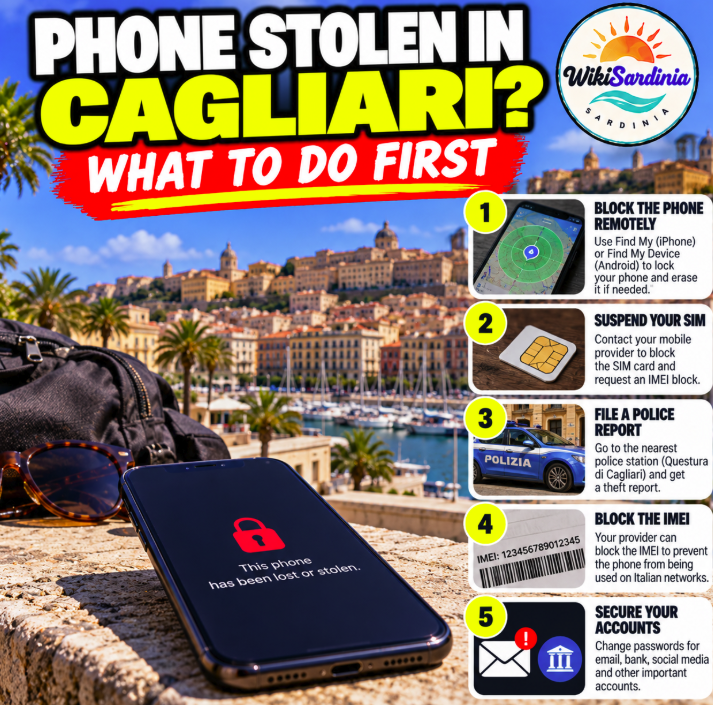
Had your phone stolen in Cagliari? Act quickly to protect your data and mobile number. From another trusted device, lock the phone using its official Apple or Google service, contact your mobile operator to suspend the SIM and ask how to block the handset's IMEI, then report the theft to the police. Do not chase or confront the person who took it.
What to do first
- Get somewhere safe. If you are in immediate danger, call 112.
- Lock the phone remotely. For iPhone, use iCloud.com/find and mark it as lost. For Android, use Google's Find Hub. Use only official services.
- Suspend your SIM. Call your mobile operator so the stolen SIM cannot be used for calls, texts or account verification.
- Request an IMEI block. Ask your operator for its official procedure. You may need the IMEI, proof of ownership, identification and a theft report.
- Report the theft. Contact the Police or Carabinieri and provide the phone model, serial number or IMEI, time and location of the theft, and any relevant evidence.
- Secure important accounts. Change your email password from a trusted device, revoke sessions where possible and contact your bank if payment or banking apps may be at risk.
Find your IMEI
The IMEI is a unique identifier for your handset. You may find it on the original box, invoice or device information in your Apple or Google account. Give it only to your operator, police or insurer through official channels. Avoid websites or strangers claiming they can track a phone just by its IMEI.
SIM block and IMEI block are different
Suspending the SIM protects your mobile line. An IMEI block is intended to prevent the handset from registering on participating mobile networks. Neither action guarantees recovery or prevents use in every circumstance. Ask your operator which form and supporting documents it requires.
How to report a stolen phone in Cagliari
For theft, follow the instructions of the Police or Carabinieri for filing a formal report. A report of a lost item is not the same as a report of theft, so describe what happened accurately and use the appropriate procedure. Check the Questura di Cagliari official contact and office-hours page before visiting an office.
Use tracking safely
If Find My or Find Hub shows a location, save a screenshot and give the information to the authorities. Do not go to the location or confront a suspected thief yourself. Location data can be delayed or imprecise.
For a stolen iPhone, Apple advises enabling Lost Mode promptly and not removing the device from Find My or your Apple Account, because doing so can remove Activation Lock. Never share your passcode, account password or verification codes with anyone who claims they found the phone.
Protect your accounts and money
- Change the password for the email account used to reset other passwords.
- Contact your bank if wallet apps, banking credentials or payment cards may be exposed.
- Revoke active sessions and trusted devices where services allow it.
- Ask your operator how to protect your number from unauthorized SIM replacement or porting.
- Warn friends and family if the thief may impersonate you through messaging apps.
Should you erase the phone remotely?
Remote erasure can protect personal data, but it may affect your ability to locate the phone afterward. First use the official lost-device feature and review the manufacturer's instructions. If you decide to erase it, do so only through the official Apple or Google service. Do not trust third-party sites offering to locate or unlock a stolen handset.
What to bring when reporting the theft
- Phone make, model, colour and distinctive marks.
- IMEI or serial number, if available.
- Approximate time and place in Cagliari.
- A description of what happened and any witness details.
- Purchase receipt and operator information, if available.
- Relevant screenshots or evidence obtained lawfully.
Useful Italian phrases
- Mi hanno rubato il telefono. — My phone has been stolen.
- Vorrei sporgere denuncia per furto. — I would like to report a theft.
- Questo è il codice IMEI. — This is the IMEI number.
- Vorrei bloccare la SIM e il telefono. — I would like to block the SIM and handset.
- Ho la posizione dell'ultimo rilevamento. — I have the last known location.
Frequently asked questions
What should I do first if my phone is stolen in Cagliari?
Get safe, lock it remotely, suspend the SIM, request an IMEI block from your operator and report the theft to police.
Can I block the phone by IMEI myself?
Contact your mobile operator and follow its official procedure; requirements vary by provider.
Should I go to the location shown by tracking?
No. Save the information and pass it to the authorities rather than confronting anyone.
What if I don't know the IMEI?
Check the original box, purchase documents or the official device account, then ask your operator for guidance.
Can I remove the phone from my Apple account?
Do not remove a stolen iPhone from Find My or your Apple Account just because someone asks you to. This may remove Activation Lock.
The bottom line
If your phone is stolen in Cagliari, lock it remotely, suspend the SIM, request an IMEI block and report the theft. Protect your email and banking accounts, keep all reference numbers and never try to recover the phone yourself.
Official sources
Apple — If your iPhone or iPad is stolen; Google — Find, secure or erase a lost Android device; Questura di Cagliari — official contacts.